Tips and tricks
React Native - Run the Application in Mac OS X Simulator
Make sure you have xCode installed
In Settings > Platforms, you should have some kind of ios installed
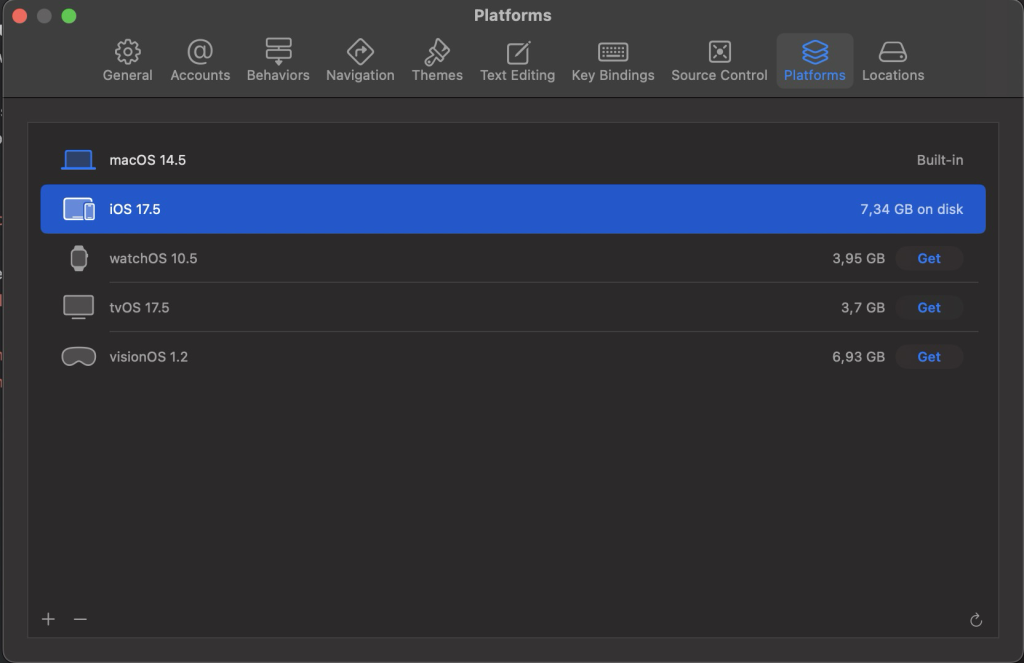
🔄 You need dependencies
Install CocoaPods:
brew update
brew install cocoapods
pod --version
🔄 You need a Simulator runtime
Download one via the apple developer page, install it with:
sudo xcrun simctl runtime add <PATH_TO_THE_DOWNLIADED_DMG_FILE>🔄 Step 2: After it’s installed, create a fresh simulator:
Once the runtime is available, run:
xcrun simctl create "My iPhone 15" com.apple.CoreSimulator.SimDeviceType.iPhone-15 com.apple.CoreSimulator.SimRuntime.iOS-17-5
make sure the SimRuntime matches your package version – for example for 18.6 → iOS-18-6
Then boot it:
xcrun simctl boot "My iPhone 15"
open -a Simulator
If you have Mac OS X, you can install a separate Ruby with HomeBrew
in your project, run:
gem install cocoapodsRebuild app
npx react-native-clean-project
npx pod-install
npx react-native run-ios
Run in another language
xcrun simctl boot "My iPhone 15"
xcrun simctl spawn booted defaults write -g AppleLanguages '("fr")'
xcrun simctl spawn booted defaults write -g AppleLocale "fr_FR"
Restart Simulator
killall -9 com.apple.CoreSimulator.CoreSimulatorService
killall Simulator
Clean Derived Data
rm -rf ~/Library/Developer/Xcode/DerivedData/FoodPlanner-*
Install GIT / OpenSSH on Windows / PowerShell
Generate a SSL Certificate on your Machine for your site